E21 Computer Engineering Fundamentals
October 8, 2026

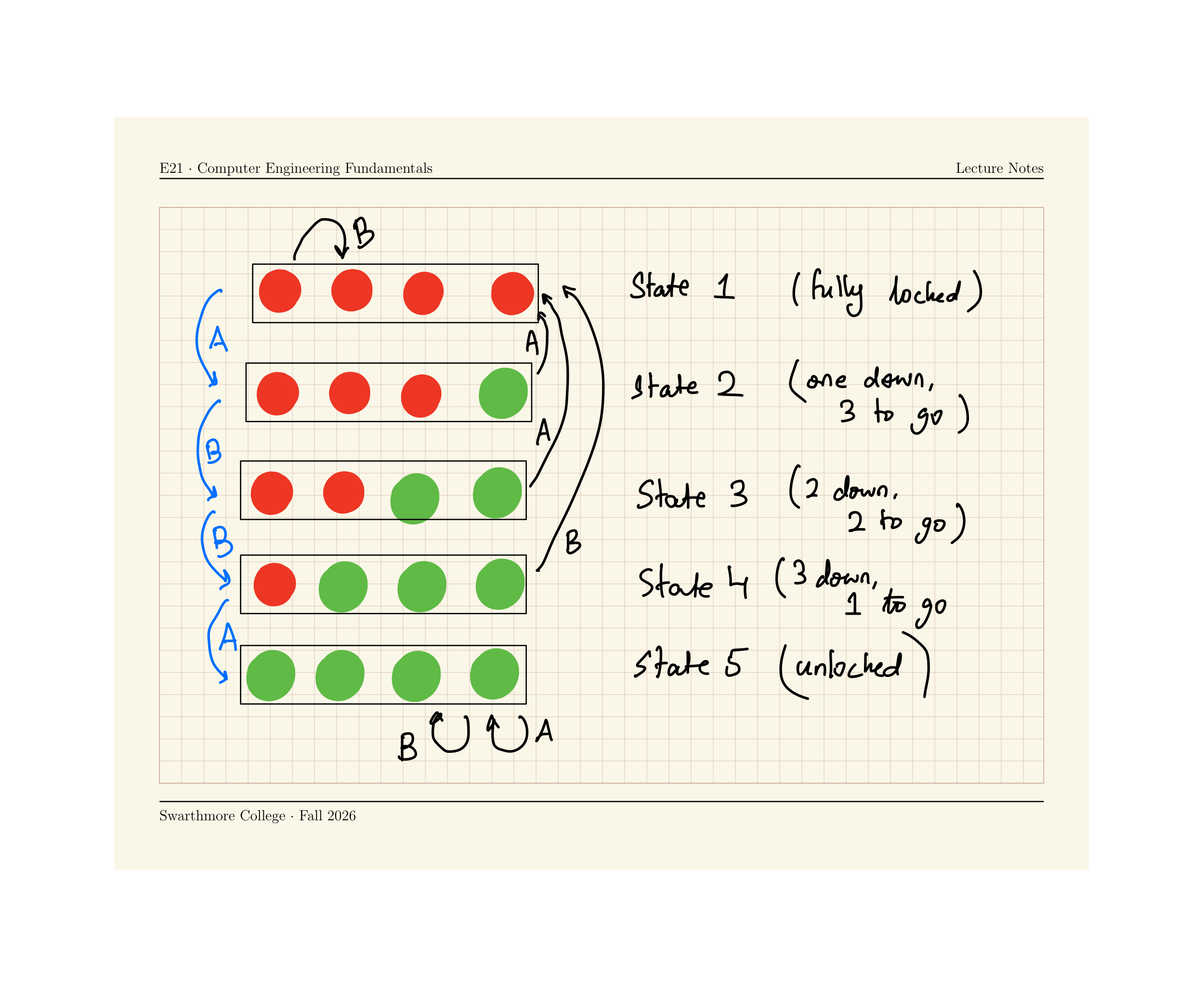
Run the following code to implement a FSM for a 4-step combination lock on the Circuit Playground Express.
Press some combination of A and B to unlock your device. All four lights green = unlocked!
from adafruit_circuitplayground.express import cpx
import time
state = 1
def wait_till_release_A():
while cpx.button_a:
print("release button to complete transition")
time.sleep(0.5)
def wait_till_release_B():
while cpx.button_b:
print("release button to complete transition")
time.sleep(0.5)
while True:
time.sleep(0.05)
# Define what each state looks like
if state == 1:
# Locked state
for k in range(0,4):
cpx.pixels[k] = (50,0,0)
elif state == 2:
# One correct entry
for k in range(1,4):
cpx.pixels[k] = (50,0,0)
cpx.pixels[0] = (0,50,0)
elif state == 3:
# Two correct entry
for k in range(2,4):
cpx.pixels[k] = (50,0,0)
for k in range(0,2):
cpx.pixels[k] = (0,50,0)
elif state == 4:
# Three correct entry
cpx.pixels[3] = (50,0,0)
for k in range(0,3):
cpx.pixels[k] = (0,50,0)
elif state == 5:
# Four correct entry -- unlocked !
for k in range(0,4):
cpx.pixels[k] = (0,50,0)
if state == 1:
if cpx.button_a:
state = 2
print("Button A pressed! moving from state 1 to state 2")
wait_till_release_A()
elif cpx.button_b:
state = 1
print("Button B pressed! moving from state 1 to state 1")
wait_till_release_B()
if state == 2:
if cpx.button_a:
state = 1
print("Button A pressed! moving from state 1 to state 2")
wait_till_release_A()
elif cpx.button_b:
state = 3
print("Button B pressed! moving from state 1 to state 1")
wait_till_release_B()
if state == 3:
if cpx.button_a:
state = 1
print("Button A pressed! moving from state 1 to state 2")
wait_till_release_A()
elif cpx.button_b:
state = 4
print("Button B pressed! moving from state 1 to state 1")
wait_till_release_B()
if state == 4:
if cpx.button_a:
state = 5
print("Button A pressed! moving from state 1 to state 2")
wait_till_release_A()
elif cpx.button_b:
state = 1
print("Button B pressed! moving from state 1 to state 1")
wait_till_release_B()
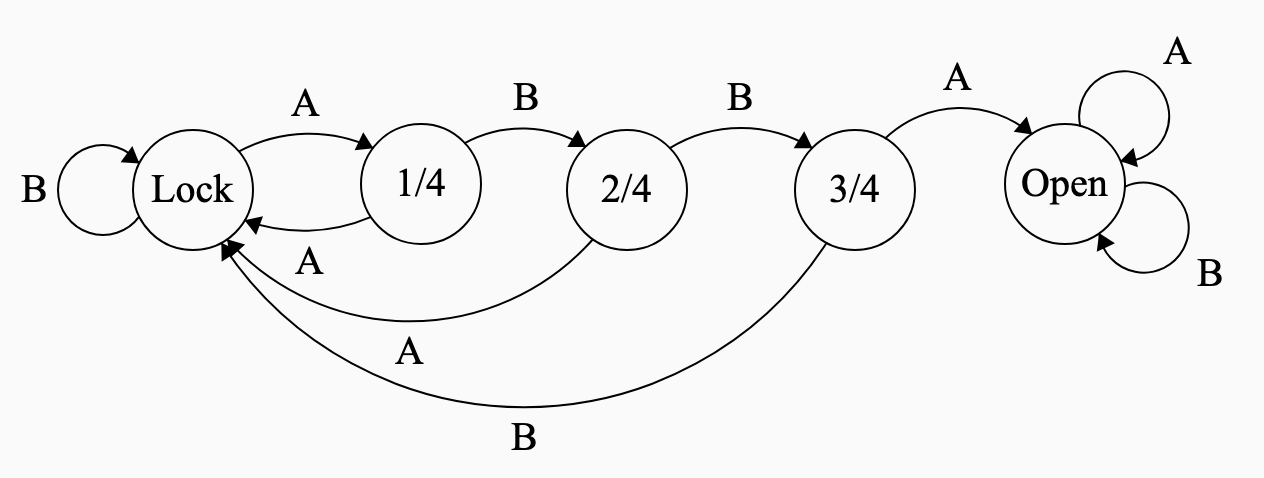
Draw the state transition diagram for this
ABBA opens the lock
| State | Input: A |
Input: B |
|---|---|---|
| Locked | 1 Correct | Locked |
| 1 Correct | Locked | 2 Correct |
| 2 Correct | Locked | 3 Correct |
| 3 Correct | Unlocked | Locked |
| Unlocked | Unlocked | Unlocked |
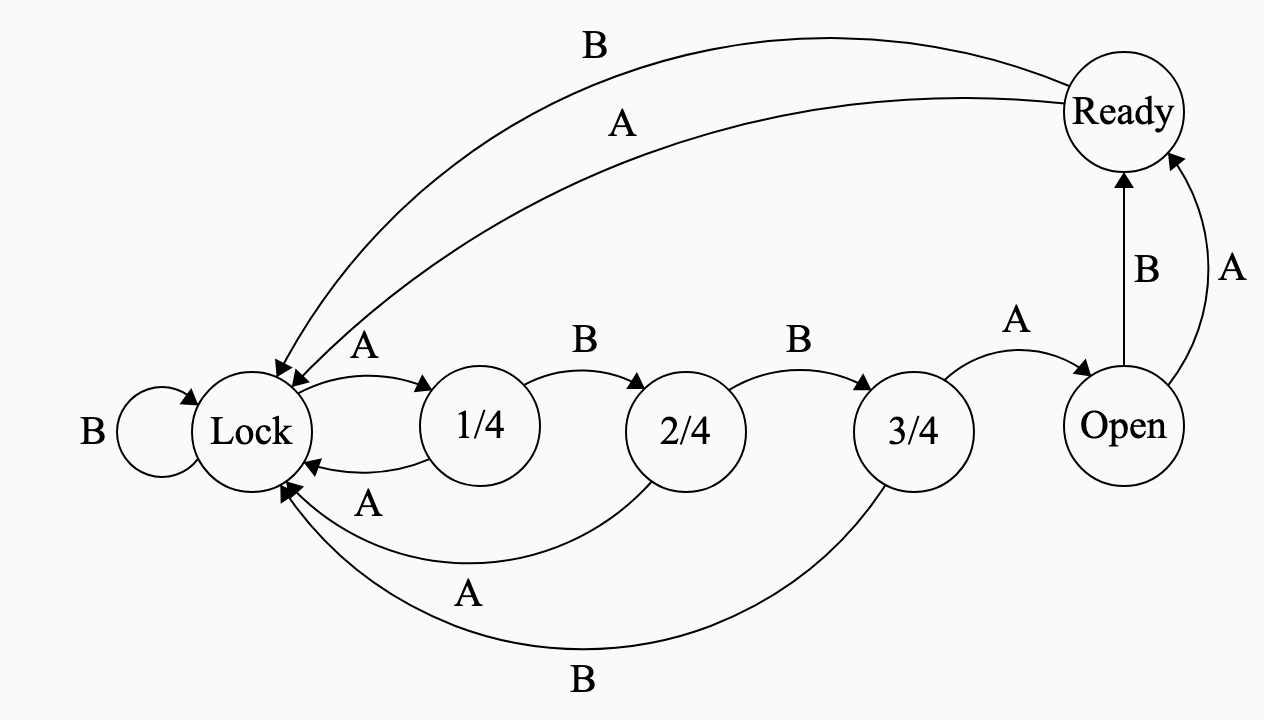
To accommodate the new specifications:
Create a new state and add it to the table
| State | Input: A |
Input: B |
|---|---|---|
| Locked | 1 Correct | Locked |
| 1 Correct | Locked | 2 Correct |
| 2 Correct | Locked | 3 Correct |
| 3 Correct | Unlocked | Locked |
| Unlocked | Ready | Ready |
| Ready | Locked | Locked |
0 and 1.1), Nib retracted (0)1), Don’t press button (0)| State | Input | New State |
|---|---|---|
| 0 | 0 | 0 |
| 0 | 1 | 1 |
| 1 | 0 | 1 |
| 1 | 1 | 0 |
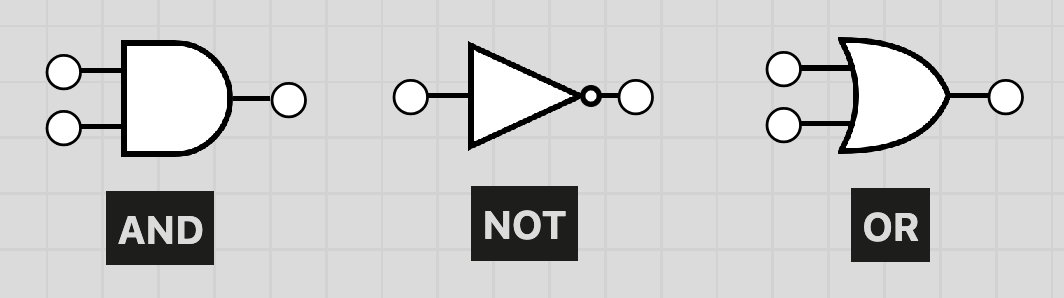
A AND B is True if and only if both A and B are True
NOT A is True if and only if A is False.
A OR B is True if and only if either A or B (or both) are True
These three logic gates can be used to implement truth tables, and therefore Finite State Machines
| State | Input | New State |
|---|---|---|
| 0 | 0 | 0 |
| 0 | 1 | 1 |
| 1 | 0 | 1 |
| 1 | 1 | 0 |

Let’s return to the 4-step combination lock.
| State | Input: A |
Input: B |
|---|---|---|
| Locked | 1 Correct | Locked |
| 1 Correct | Locked | 2 Correct |
| 2 Correct | Locked | 3 Correct |
| 3 Correct | Unlocked | Locked |
| Unlocked | Ready | Ready |
| Ready | Locked | Locked |
To get a truth table for this, we:
000. 1 Correct: 001. 2 Correct: 010. 3 Correct: 011. Unlocked: 100. Ready: 101.0 and B = 1ABBA| State | Input | New State |
|---|---|---|
000 |
0 |
001 |
000 |
1 |
000 |
001 |
0 |
000 |
001 |
1 |
010 |
010 |
0 |
? |
010 |
1 |
? |
011 |
0 |
? |
011 |
1 |
? |
100 |
0 |
101 |
100 |
1 |
101 |
101 |
0 |
000 |
101 |
1 |
000 |
| State | Input A 0 |
Input A 1 |
|---|---|---|
| ◯ ◯ ◯ ◯ | ✓ ◯ ◯ ◯ | ◯ ◯ ◯ ◯ |
| ✓ ◯ ◯ ◯ | ◯ ◯ ◯ ◯ | ✓ ✓ ◯ ◯ |
| ✓ ✓ ◯ ◯ | ◯ ◯ ◯ ◯ | ✓ ✓ ✓ ◯ |
| ✓ ✓ ✓ ◯ | ✓ ✓ ✓ ✓ | ◯ ◯ ◯ ◯ |
| ✓ ✓ ✓ ✓ | Ready | Ready |
| Ready | ◯ ◯ ◯ ◯ | ◯ ◯ ◯ ◯ |
Definitions:
| State | Encoding | Meaning |
|---|---|---|
| ◯ ◯ ◯ ◯ | 000 |
Locked |
| ✓ ◯ ◯ ◯ | 001 |
1 down |
| ✓ ✓ ◯ ◯ | 010 |
2 down |
| ✓ ✓ ✓ ◯ | 011 |
3 down |
| ✓ ✓ ✓ ✓ | 100 |
Unlocked |
| Ready | 101 |
Ready |
Fill in the new state column

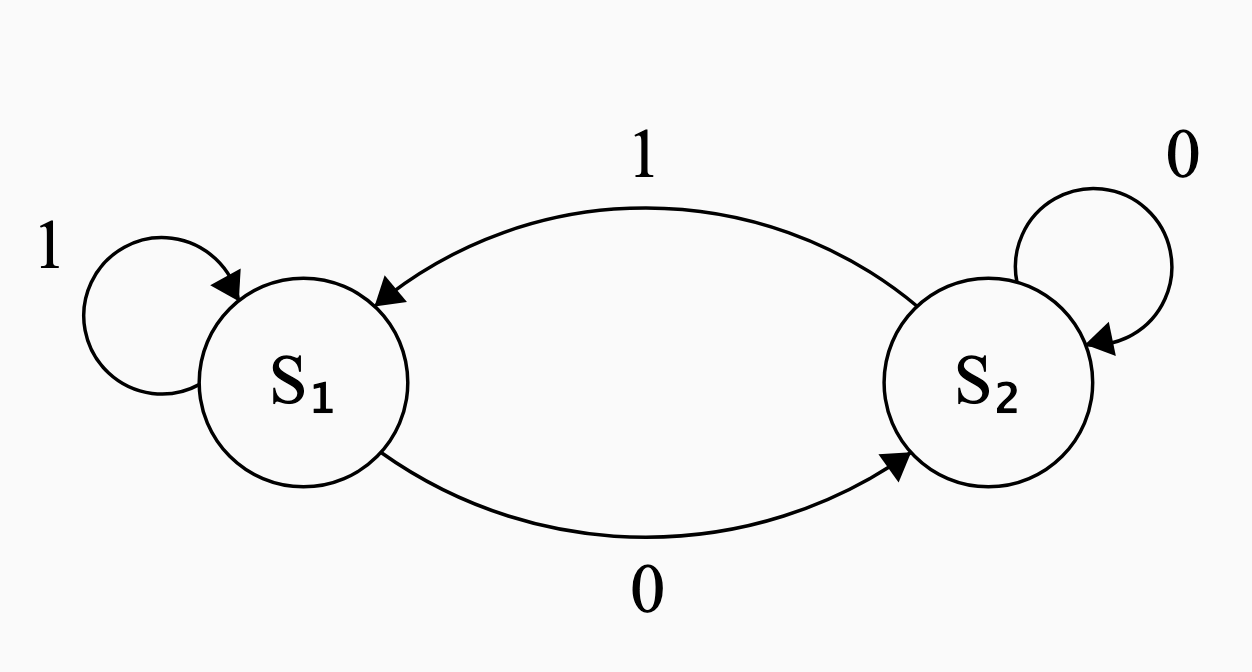
0, \(S_2\) is 1.| State | Input 0 |
Input 1 |
|---|---|---|
0 |
1 |
0 |
1 |
1 |
0 |

0, \(S_2\) is 1.| State | Input | New State |
|---|---|---|
0 |
0 |
1 |
0 |
1 |
0 |
1 |
0 |
1 |
1 |
1 |
0 |

| State (A) | Input (B) | New State |
|---|---|---|
0 |
0 |
1 |
0 |
1 |
0 |
1 |
0 |
1 |
1 |
1 |
0 |
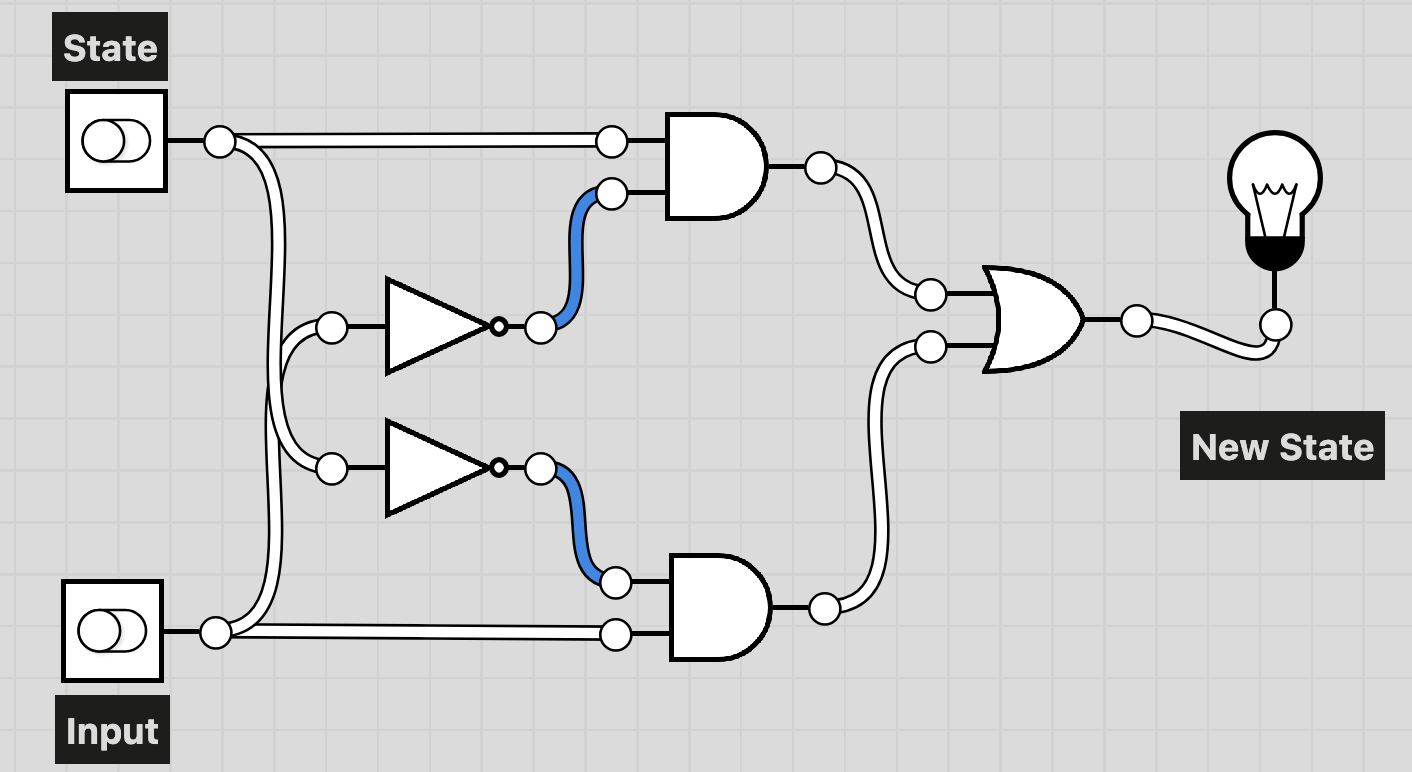
Draw a logic-gate diagram for this truth table using AND OR and NOT
Strategy:
Look for a combination of and, or and not statements that describe the new state column in terms of the other two columns.
Write out a boolean statement in words.
New State is 1 if State and Input are both 0, or if State is 1 and Input is 0.
Write down the conditions needed for New State to be 1.
= (not A and not B) or (A and not B).
Otherwise, New State is assumed to be 0 because of the law of excluded middle
We have learned four different ways of representing a Finite State Machine:
E21 • Fall 2026 • Lecture 12 • October 8, 2026 • ↩︎