HW 6 Solutions
ENGR 21, Fall 2026.
Solutions
1 The Farmer Was Replaced
Download the save file here to ensure that you’ve unlocked all that’s required for this assignment.
The Farmer Was Replaced now has ‘Polyculture favorites’. To check if a particular plant has a ‘Polyculture favorite’, use the function get_companion() while your drone is hovering over a cell with a plant growing on it. The function get_companion() returns two outputs. The first output is the type of plant that would be this plant’s ‘Polyculture favorite’, and the second output is a tuple of x-y values that tell you where this companion plant should go.
1.2 A function to plant companions
Write a function that
- Checks if a plant has a companion. If not, it doesn’t do anything.
- If it does have a companion, the drone navigates to the companion’s favored location. You should make use of the function you wrote in Section 1.1.
- Once it is at the favored location, it plants the desired companion plant at this location.
- The drone then returns to the location of the first plant.
The above should work regardless of whether there is currently a plant at that location. Assume that the entire farm is tilled soil, not grassland, for this purpose.
The following function achieves this objective. Note that it is desirable, but not necessary, to wait for any currently-existing plant to be done growing.
def plant_companion():
  if not get_companion() == None:
    plant_this,go_here = get_companion()
    come_back = (get_pos_x(),get_pos_y())
    print("Companion is ",plant_this)
    nav(go_here)
    if not get_entity_type() == None:
      # there is a plant here
      while not can_harvest():
        pass
      harvest()
    plant(plant_this)
    navigate_to(come_back)
To see this function in action, you may wish to call it inside a program that plants a random plant on each spot and then plants its companion, if applicable.
from positioning import zeroloc
from f12 import plant_companion

crops = {
  "t": Entities.Tree,
  "g": Entities.Grass,
  "c": Entities.Carrot,
  "b": Entities.Bush
}

possible_crops = ["t","b","c","g"]
zeroloc()
for row in range(get_world_size()):
  for col in range(get_world_size()):
    ind = random() *len(possible_crops) // 1
    crop = crops[possible_crops[ind]]
    #plant(crop)
    plant_companion()
    move(East)
  move(North)
2 Two-state FSM

2.1 Four ways of representing a Finite State Machine
A coin-operated turnstile, shown in Figure 1, is to be designed using a two-state finite-state machine. It has two states: Locked and Unlocked. There are two possible inputs that it can accept: (1) you can put a coin in it, and (2) you can push through the turnstile.
The turnstile operates as follows.
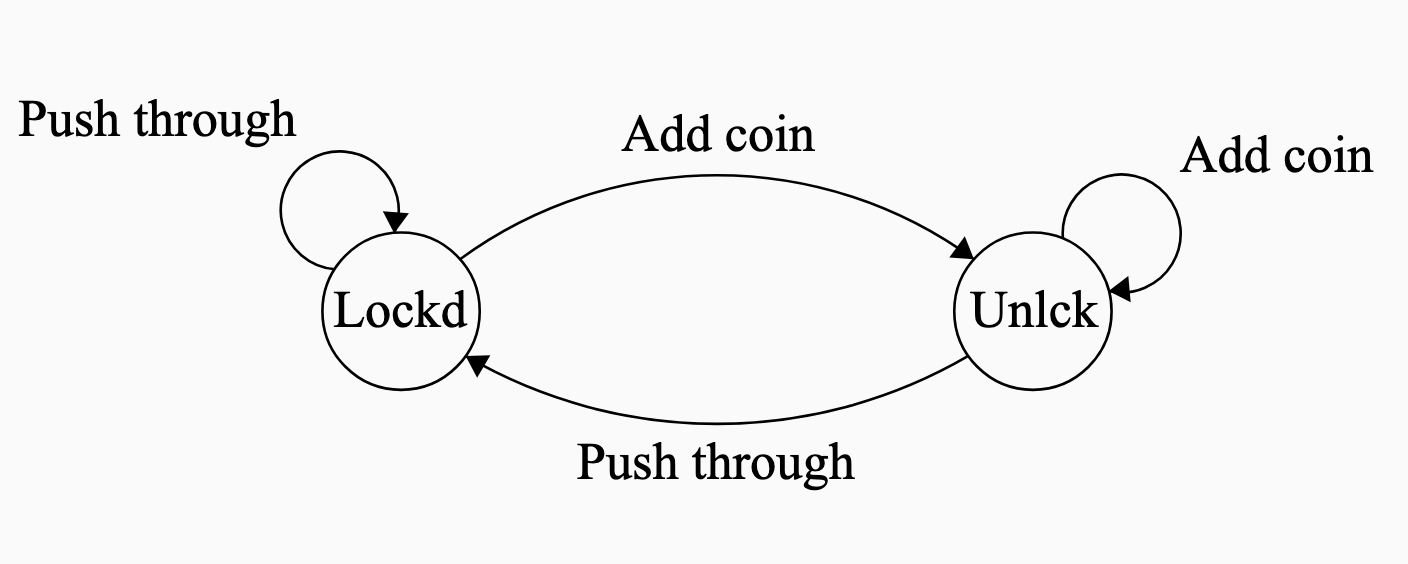
If the user enters a coin while the turnstile is locked, the turnstile becomes unlocked. Adding any more coins doesn’t do anything; the turnstile remains locked. If the user pushes through the turnstile while it is unlocked, the turnstile lets him through and the turnstile locks again. If the user tries to push through the turnstile while it is locked, nothing happens and the turnstile stays locked.
Using the given states and inputs,
- Construct a state-transition diagram. You are encouraged to make use of the ‘Finite State Machine Designer’ website here to produce professional quality diagrams, but this is not necessary. Label your states and inputs descriptively with words, rather than numbers.
The following state-transition diagram is an appropriate solution to this problem.
- Make a state-transition table. Use words, not numbers, to label your states and inputs.
The following state-transition table is an appropriate solution to this problem.
| Current State |
Coin | Push |
|---|---|---|
| Locked | Unlocked | Locked |
| Unlocked | Unlocked | Locked |
- Make a truth table using the following values as ‘names’ in binary:
- the unlocked state is
0, - the locked state is
1, - adding a coin is encoded by
0 - pushing the turnstile is encoded by
1.
The following truth table is an appropriate solution to this problem.
| Current State |
Input | New State |
|---|---|---|
0 |
0 |
0 |
0 |
1 |
1 |
1 |
0 |
0 |
1 |
1 |
1 |
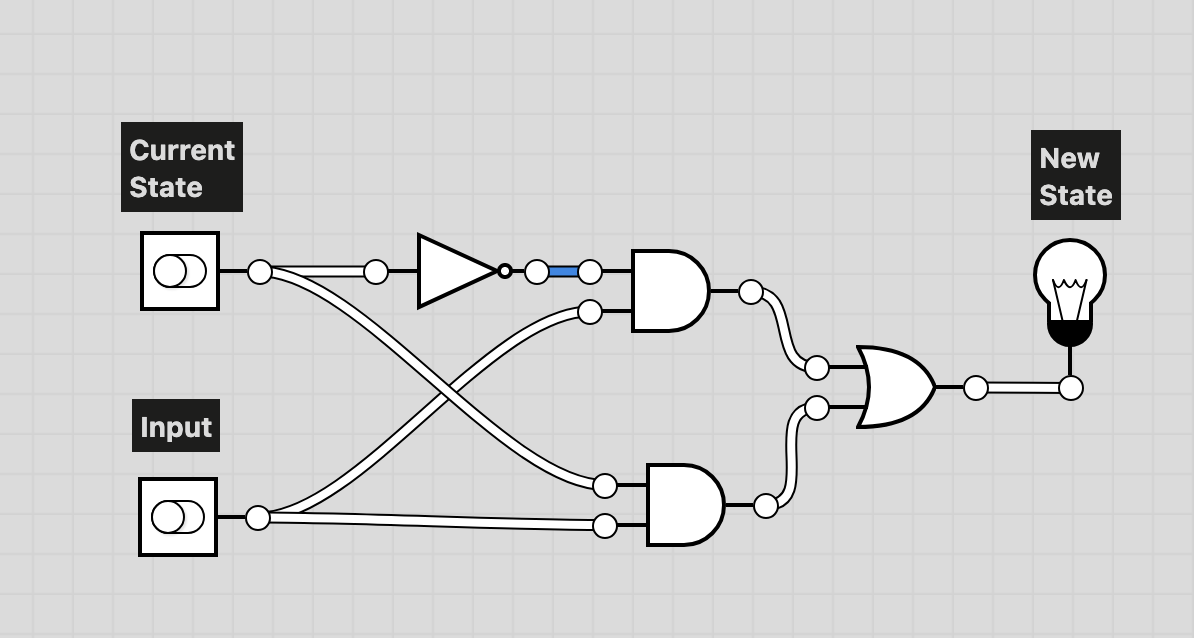
- Make a logic diagram for this truth table using And, Or, and Not gates.
While it is possible to make a logic diagram that uses only a Not gate connected to the current state, the question asks you to take the more verbose route of using all three types of gates.
3 Modified Finite State Machine
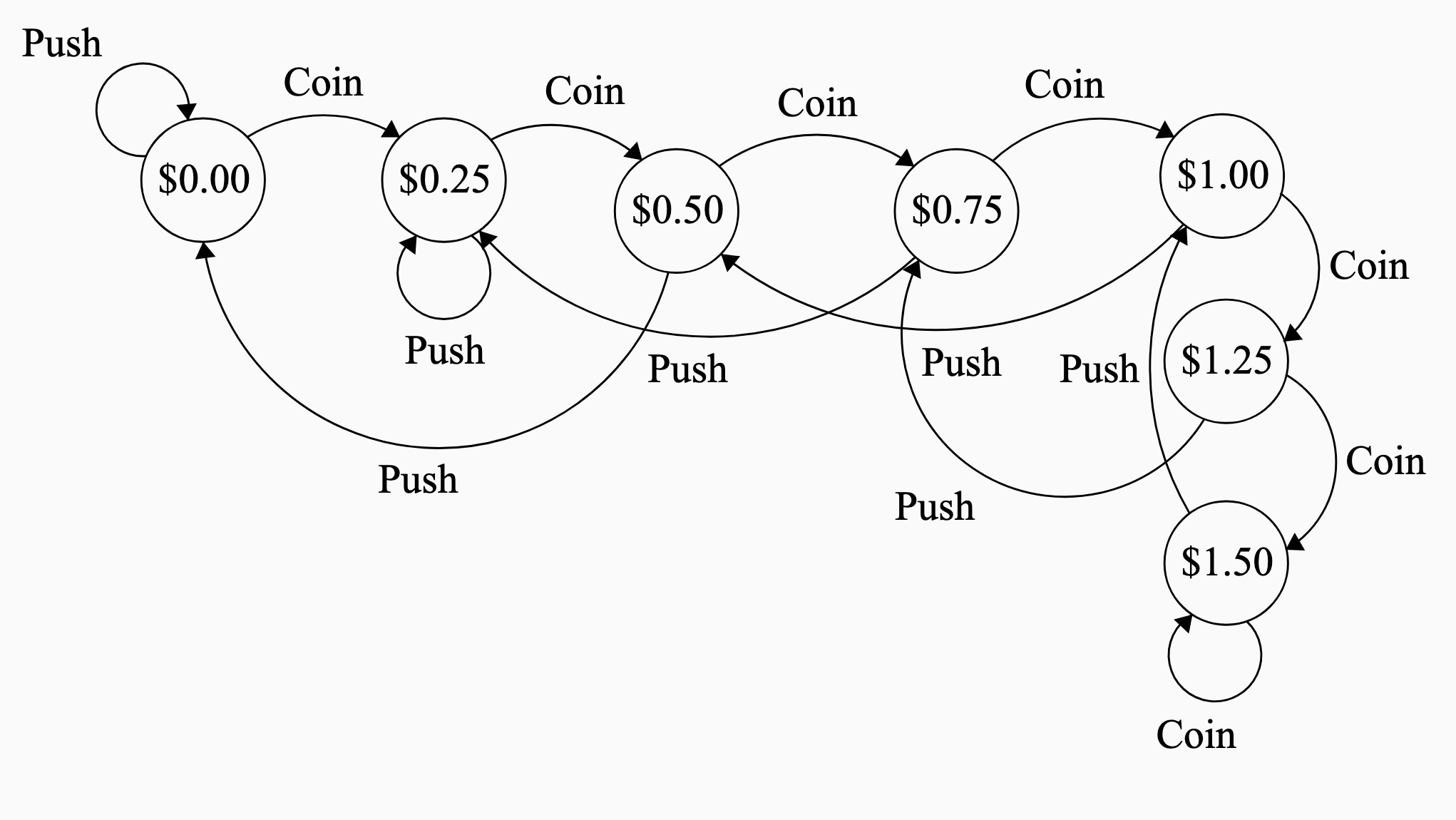
You are tasked with designing a new finite state machine that allows up to three people at a time to go through the turnstile at a cost of $0.50 each. The machine only accepts quarters. When two quarters have been entered into the turnstile, one person can pass through before the machine becomes locked again.. If four quarters are entered into the turnstile, two people can pass through before it becomes locked again. Entering more than $1.50 does not have any effect. So, for example, if $2.00 is entered into the machine, it will still only let three people pass, not four.
Draw the state transition diagram for this finite state machine, labeling each state with the number of cents/dollars that have been entered. Assume that the initial state is $0.00.
How many rows and columns will the state-transition table for this FSM have? You do not need to write out the table. Do not include the header row and the column containing the list of present states.
Write out the truth table for this finite state machine. Each state should be labeled by the number of quarters it currently recognizes inside the machine, in binary. Entering a coin should be labeled
1and pushing through should be labeled0.
The state transition diagram for this finite state machine is as follows.
Because there are two inputs, the state transition table will have two columns (3 if you count the column with the states names)
Because there are seven states, it will have seven rows (8 if you count the row with the input names.)
The truth table will have 14 rows and will look like the following. Note that the states are labeled as follows:
- $0.00 is
000 - $0.25 is
001 - $0.50 is
010 - $0.75 is
011 - $1.00 is
100 - $1.25 is
101 - $1.50 is
110
and the inputs are:
- Push:
0 - Coin:
1
- $0.00 is
| State | Input | New State |
|---|---|---|
000 |
0 |
000 |
000 |
1 |
001 |
001 |
0 |
001 |
001 |
1 |
010 |
010 |
0 |
000 |
010 |
1 |
011 |
011 |
0 |
001 |
011 |
1 |
100 |
100 |
0 |
010 |
100 |
1 |
101 |
101 |
0 |
011 |
101 |
1 |
110 |
110 |
0 |
100 |
110 |
1 |
110 |
4 Logic Gates and Boolean expressions
4.1 Equivalence of Boolean expressions
You may wish to consult this trurth table generator for this assignment.
The following truth table expresses the relationship between 3 ‘inputs’ a, b and c, and one ‘output’ d (this is why there are \(2^3=8\) entries). Here, the word ‘input’ could refer to either a FSM’s input or a FSM’s current state. The word ‘output’, in a FSM context, refers to the next state of the FSM for that combination of inputs and states.
| a | b | c | d |
|---|---|---|---|
| F | F | F | F |
| F | F | T | F |
| F | T | F | T |
| F | T | T | F |
| T | F | F | T |
| T | F | T | T |
| T | T | F | T |
| T | T | T | T |
There are several different ways to express this truth table. For example, the following would work.
- d = (a and b and c) or (a and b and not c) or (a and not b and c) or (a and not b and not c) or (not a and b and not c)
This is an unnecessarily verbose way of describing this truth table. There is a much simpler expression that involves only three boolean operators when written out in English. Find a simpler expression of this truth table using at most three boolean operators.
The expression ‘a and b and c’ is an example of a Boolean expression with two operators. The expression ‘(a and not b) or c’ has three operators.
The desired expression is that d equals a or (b and not c). The parantheses are optional.
4.2 Simplifying Truth Tables
The following truth table can be expressed in the following way: c = (not a and not b) or (not a and b). However, there is a much simpler Boolean expression that can be used here instead to relate c, the output, to a and b, the inputs. Find the most simple statement of how c depends on a and b. Then, draw the logic diagram for both the original statement c = (not a and not b) or (not a and b) and for your simplified statement.
| a | b | c |
|---|---|---|
| F | F | T |
| F | T | T |
| T | F | F |
| T | T | F |
The desired expression is that c equals not a. The truth value of b is irrelevant.
5 A new combination lock
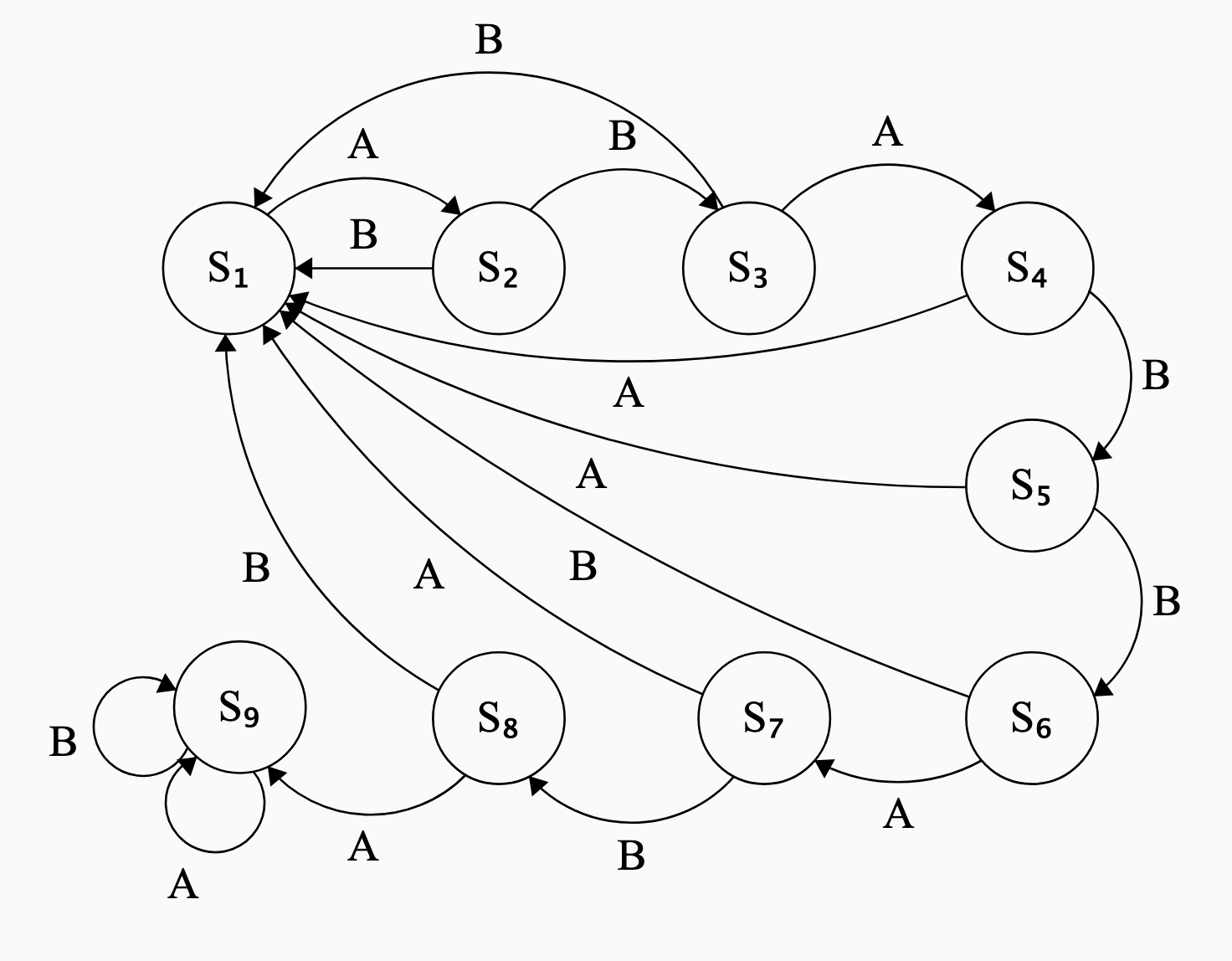
Your task in this part of the homework assignment is to create a ‘combination lock’, similar to the one discussed in class, that ‘unlocks’ when the code ABABBABA is entered. The ‘locked’ state is shown with eight consecutive neopixels shown red; each correct entry (A or B) should sequentially turn the neopixels green, one by one. You do not need any states after the fully-unlocked state is reached.
- Draw the State Transition Diagram for this system. Please use \(S_1\), \(S_2\), … for your state names, and A/B for the input names.
- Implement this on the Circuit Playground Express, similar to the code used in class.
Code
from adafruit_circuitplayground.express import cpx
import time

state = 1

def wait_till_release_A():
    while cpx.button_a:
        print("release button to complete transition")
        time.sleep(0.5)
def wait_till_release_B():
    while cpx.button_b:
        print("release button to complete transition")
        time.sleep(0.5)

while True:
    time.sleep(0.05)
    # Define what each state looks like
    if state == 1:
        # Locked state
        for k in range(0,8):
            cpx.pixels[k] = (50,0,0)
    elif state == 2:
        # One correct entry
        for k in range(1,8):
            cpx.pixels[k] = (50,0,0)
        cpx.pixels[0] = (0,50,0)
    elif state == 3:
        # Two correct entry
        for k in range(2,8):
            cpx.pixels[k] = (50,0,0)
        for k in range(0,2):
            cpx.pixels[k] = (0,50,0)
    elif state == 4:
        # Three correct entry
        for k in range(3,8):
            cpx.pixels[k] = (50,0,0)
        for k in range(0,3):
            cpx.pixels[k] = (0,50,0)
    elif state == 5:
        # Four correct entry
        for k in range(4,8):
            cpx.pixels[k] = (50,0,0)
        for k in range(0,4):
            cpx.pixels[k] = (0,50,0)
    elif state == 6:
        # Five correct entry
        for k in range(5,8):
            cpx.pixels[k] = (50,0,0)
        for k in range(0,5):
            cpx.pixels[k] = (0,50,0)
    elif state == 7:
        # Six correct entry
        for k in range(6,8):
            cpx.pixels[k] = (50,0,0)
        for k in range(0,6):
            cpx.pixels[k] = (0,50,0)
    elif state == 8:
        # Seven correct entry
        for k in range(7,8):
            cpx.pixels[k] = (50,0,0)
        for k in range(0,7):
            cpx.pixels[k] = (0,50,0)
    elif state == 9:
        # Eight correct entry
        for k in range(8,8):
            cpx.pixels[k] = (50,0,0)
        for k in range(0,8):
            cpx.pixels[k] = (0,50,0)

    if state == 1:
        if cpx.button_a:
            state = 2
            print("Correct!")
            wait_till_release_A()
        elif cpx.button_b:
            state = 1
            print("Incorrect!")
            wait_till_release_B()

    if state == 2:
        if cpx.button_a:
            state = 1
            print("Incorrect!")
            wait_till_release_A()
        elif cpx.button_b:
            state = 3
            print("Correct!")
            wait_till_release_B()

    if state == 3:
        if cpx.button_a:
            state = 4
            print("Correct!")
            wait_till_release_A()
        elif cpx.button_b:
            state = 1
            print("Incorrect!")
            wait_till_release_B()

    if state == 4:
        if cpx.button_a:
            state = 1
            print("Incorrect!")
            wait_till_release_A()
        elif cpx.button_b:
            state = 5
            print("Correct!")
            wait_till_release_B()

    if state == 5:
        if cpx.button_a:
            state = 1
            print("Incorrect!")
            wait_till_release_A()
        elif cpx.button_b:
            state = 6
            print("Correct!")
            wait_till_release_B()

    if state == 6:
        if cpx.button_a:
            state = 7
            print("Correct!")
            wait_till_release_A()
        elif cpx.button_b:
            state = 1
            print("Incorrect!")
            wait_till_release_B()

    if state == 7:
        if cpx.button_a:
            state = 1
            print("Incorrect!")
            wait_till_release_A()
        elif cpx.button_b:
            state = 8
            print("Correct!")
            wait_till_release_B()

    if state == 8:
        if cpx.button_a:
            state = 9
            print("Correct!")
            wait_till_release_A()
        elif cpx.button_b:
            state = 1
            print("Incorrect!")
            wait_till_release_B()