Lecture 10
E21 Computer Engineering Fundamentals
Manipulating Data in numpy
Download the data file here and look at the official documentation here
Consists of 3 days of temperature data recorded at half-hour intervals. First time (hours), then temperature in F.
Reformat the data in the form of an N rows, 2 column numpy array.
Solution
Obtain shape of dataset
data = np.loadtxt("Temp_data.txt")
np.shape(data)
We find that the dataset is 290 entries long.
(290,)Reshape it into 2 x 145 set.
data2 = np.reshape(data,(2,145))Transpose it to have 145 rows and 2 columns
data3 = np.transpose(data2)
Initializing multi-dimensional arrays
Arrays in numpy can be initialized using:
onesnp.ones((3,4))array([[1., 1., 1., 1.], [1., 1., 1., 1.], [1., 1., 1., 1.]])zerosnp.zeros((5,2))array([[0., 0.], [0., 0.], [0., 0.], [0., 0.], [0., 0.]])Random numbers
np.random.random((3,2))array([[0.73, 0.91], [0.47, 0.32], [0.89, 0.07]])
The type of an array can be changed using functions such as numpy.float64, numpy.int64, np.bool() etc.
Random number generation
It is often useful to generate random numbers.
- A single random number between 0 and 1:
numpy.random.random() - An array of 3 random numbers:
numpy.random.random(3) - Three rows and two columns of random numbers:
numpy.random.random((3,2)) - A single random integer between 0 and
n, not inclusive ofn:numpy.random.randint(n) - A single random integer between
mandn, not inclusive ofn:numpy.random.randint(m,n)
Slice notation in numpy arrays
a = np.array([[0.95, 0.3 , 0.53, 0.55, 0.73],
           [0.12, 0.17, 0.03, 0.83, 0.34],
           [0.27, 0.9 , 0.26, 0.94, 0.55],
[0.88, 0.26, 0.5 , 0.5 , 0.05]])- Rows and columns can be selected using ‘slices’ of a
numpyarray
| 0.07 | 0.14 | 0.23 | 9.42 | 7.73 |
| 4.56 | 6.88 | 0.99 | 5.32 | 6.36 |
| 9.34 | 6.38 | 7.48 | 8.05 | 6.01 |
| 4.00 | 4.35 | 1.43 | 9.01 | 3.93 |
To select the third row:
a[2,:]‘Row number 2, All columns’
To select the fourth column:
a[:,3]‘All rows, column number 3’
Slicing from ends
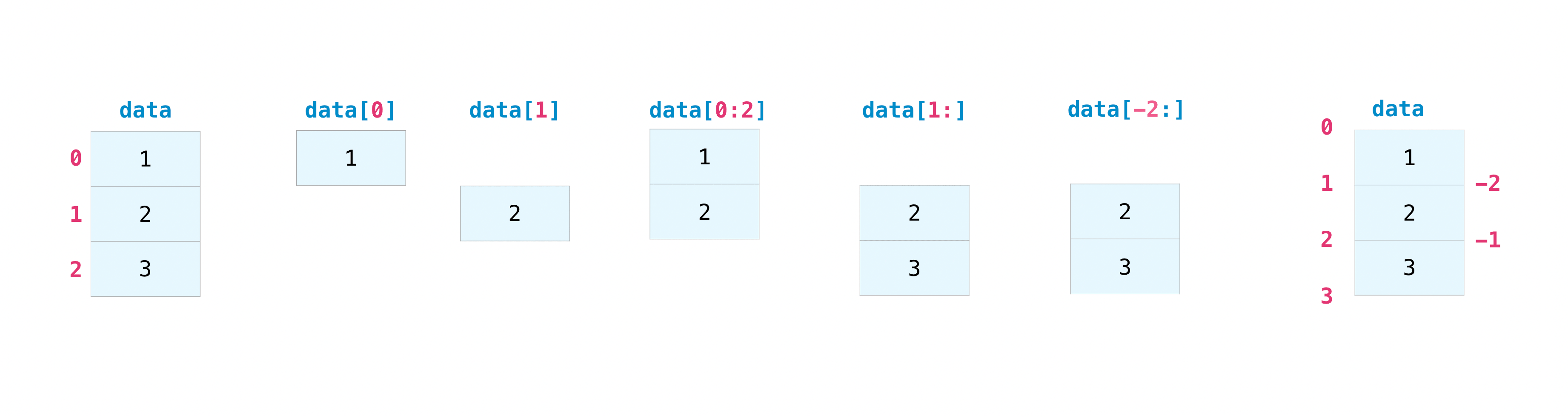
- This follows Python’s usual conventions:
- Indexing starts from zero
- The last element is not included
- The array
example[0:5]is a subset ofexamplewith 5 elements starting from index0. - The array
example[2:4]is a subset ofexamplewith 2 elements starting from index2.
- The array
- Slicing from ends can work in multiple dimensions.
- Negative numbers count from the end
Cherry-picking an array
example = np.array([1.81, 8.17, 6.93, 1.54, 0.39, 4.96, 2.66, 6.03, 4.85, 6.43])Create an array containing only the second, fourth, and seventh element of this array.
example[[1,3,6]][A list of integers can be used to access the nth elements of a numpy array.]
Practice with slicing arrays
Obtain the following subsets by slicing the given array (no cherry-picking)
ex = np.array([[70, 96, 77, 89, 66, 78, 37,  4],
               [36, 46, 84, 19, 73, 24, 29, 25],
               [75, 66,  0, 67, 84, 16, 83, 21],
               [81, 35, 62,  5, 94, 75, 25, 76],
               [57, 31, 79, 86, 83, 54, 24,  5],
               [75, 71, 57, 58, 36, 89, 31, 17],
               [83, 94,  8, 22, 49, 74, 89, 79]])
Logical indexing
Logical indexing is a powerful feature of numpy (and MATLAB). In this approach, we index an array using booleans.
Example: Create an array containing only the values of example that are greater than 5.
example = np.array([1.81, 8.17, 6.93, 1.54, 0.39, 4.96, 2.66, 6.03, 4.85, 6.43])Without logical indexing:
example[[1,2,-1,-3]]Manually pick out the second, third, last, and third-last elements.
With logical indexing:
example[example > 5]Let Python select for you based on an array of boolean values.
A closer look at logical indexing
To understand logical indexing, let’s look at example>5 when example is a numpy array.
example = np.array([1.81, 8.17, 6.93, 1.54, 0.39, 4.96, 2.66, 6.03, 4.85, 6.43])
>>> example > 5
array([False,  True,  True, False, False, False, False,  True, False,
True])| 1.81 | False | Exclude |
| 8.17 | True | Include |
| 6.93 | True | Include |
| 1.54 | False | Exclude |
| 0.39 | False | Exclude |
| 4.96 | False | Exclude |
| 2.66 | False | Exclude |
| 6.03 | True | Include |
| 4.85 | False | Exclude |
| 6.43 | True | Include |
Chaining together multiple boolean operations
Create an array whose elements contain all the elements of example that are smaller than 5 and whose units place is an even number.
Without numpy
# Make an empty array
answer = np.array([])
for i in range(len(example)):
 # Check if even
 if np.floor(example[i]) % 2 == 0:
  # Check if smaller than 5
  if example[i] < 5:
   # Append to your array
   answer = np.append(answer,example[i])
Using numpy’s logical indexing
answer = example[(example < 5) & (np.floor(example) % 2 == 0)]- To chain two logical indexing commands together, need:
&for ‘and’: both of the two onditions apply|for ‘or’: any of the two conditions apply
Logical Indices can be used for other arrays
- Once an array of booleans has been created, it is independent of the array that was used to create it
- So you can use it to index other arrays if you want.
Example
- Select the rows of
cfor which the difference betweenaandbis less than 2.
import numpy as np
np.set_printoptions(precision=2)
a = np.array([4.58, 7.17, 8.89, 6.79, 1.58, 1.84, 6.85, 1.06, 6.37, 5.28])
b = np.array([4.72, 6.83, 3.01, 4.76, 0.23, 7.88, 3.04, 0.78, 7.99, 7.69])
c = np.array([49, 99, 34, 13, 33,  1, 56, 39, 83, 77])

print(a)
print(b)
for i in range(len(a)):
    if abs(b[i] - a[i]) < 2:
        print(f"The {i}th elements of a and b are within 3 of each other")
This is incomplete and does not use logical indexing. Use logical indexing to accomplish this task.
a |
b |
c |
|---|---|---|
| 4.58 | 4.72 | 49.00 |
| 7.17 | 6.83 | 99.00 |
| 8.89 | 3.01 | 34.00 |
| 6.79 | 4.76 | 13.00 |
| 1.58 | 0.23 | 33.00 |
| 1.84 | 7.88 | 1.00 |
| 6.85 | 3.04 | 56.00 |
| 1.06 | 0.78 | 39.00 |
| 6.37 | 7.99 | 83.00 |
| 5.28 | 7.69 | 77.00 |
Flip, Reshape, Transpose
a = np.array([0.34, 0.56, 0.90])
b = np.array([[0.95, 0.3 , 0.53, 0.55, 0.73],
           [0.12, 0.17, 0.03, 0.83, 0.34],
           [0.27, 0.9 , 0.26, 0.94, 0.55],
           [0.88, 0.26, 0.5 , 0.5 , 0.05]])
The
numpy.flip()command reverses an arrayOptional argument:
numpy.flip(example, axis=1)np.flip(a) np.flip(b,axis=0) np.flip(b,axis=1)
The
reshape()command re-arranges data in an array:np.reshape(b,(10,2))Rearranges
binto a matrix with 10 rows, 2 columnsThe
transposecommand reverses the rows and columns of a 2-D matrixnp.transpose(b)
Concatenating, i.e., stacking numpy arrays
Arrays can be stacked vertically or horizontally.
a1 = np.array([[1, 1],
               [2, 2]])

a2 = np.array([[3, 3],
               [4, 4]])
Vertically:
np.vstack((a1, a2))array([[1, 1], [2, 2], [3, 3], [4, 4]])Horizontally:
np.hstack((a1, a2))array([[1, 1, 3, 3], [2, 2, 4, 4]])
Task: What pairs of the following arrays can be hstack’ed and what pairs cannot be hstacked ? Do the same for vstack
a = np.array([[0.87, 0.47, 0.49],
              [0.12, 0.3 , 0.42],
              [0.78, 0.03, 0.75],
              [0.08, 0.33, 0.61]])
b = np.array([[0.55, 0.78],
[0.09, 0.46],
[0.03, 0.66]])c = np.array([[0.65, 0.65, 0.1 , 0.64],
[0.06, 0.5 , 0.68, 0.69]])When stacking works and when it doesn’t
Write a function that takes as input two numpy arrays (assumed to be 2-dimensional).
Your function should return a tuple of Booleans indicating:
- Whether the two arrays can be
hstack’ed - Whether the two arrays can be
vstack’ed
def check_stacking(array1, array2):
  return (False, False)
Hint: use numpy.shape()
Equally-spaced arrays in numpy
arange— works likerangebut returns an array.arange(stop)arange(start,stop)arange(start,stop,step)- Like
range, does not include the last element!
linspace— works like MATLAB’slinspace.linspace(1,5)generates 50 numbers between 1 and 5 both inclusive.linspace(1,5,9)generates 9 numbers betwen 1 and 5 both inclusive.- By default, the last value is included (just like MATLAB’s
linspace)- If you want to mimic the behavior of
arange,range, etc. and remove the endpoint, you can pass as an optional argumentlinspace(1,5,9,endpoint=False
- If you want to mimic the behavior of
logspace— likelinspacebut on a log-log scale.
Collective operators
numpy provides the functions max, min, mean, std, and sum.
Some of these have the same name as built-in Python functions. e.g., numpy.max() is different from max().
b =np.array([[3, 9, 3, 6, 2],
             [0, 9, 9, 6, 0],
             [5, 5, 5, 4, 6],
             [5, 5, 2, 4, 9]])
Use the documentation of these functions here and use numpy to:
- Find the mean of each row
- Find the sum of each coolumn
These and many other numpy functions can be called either using the syntax a.mean() or using the syntax numpy.mean(a)
Project Euler: Programming Practice
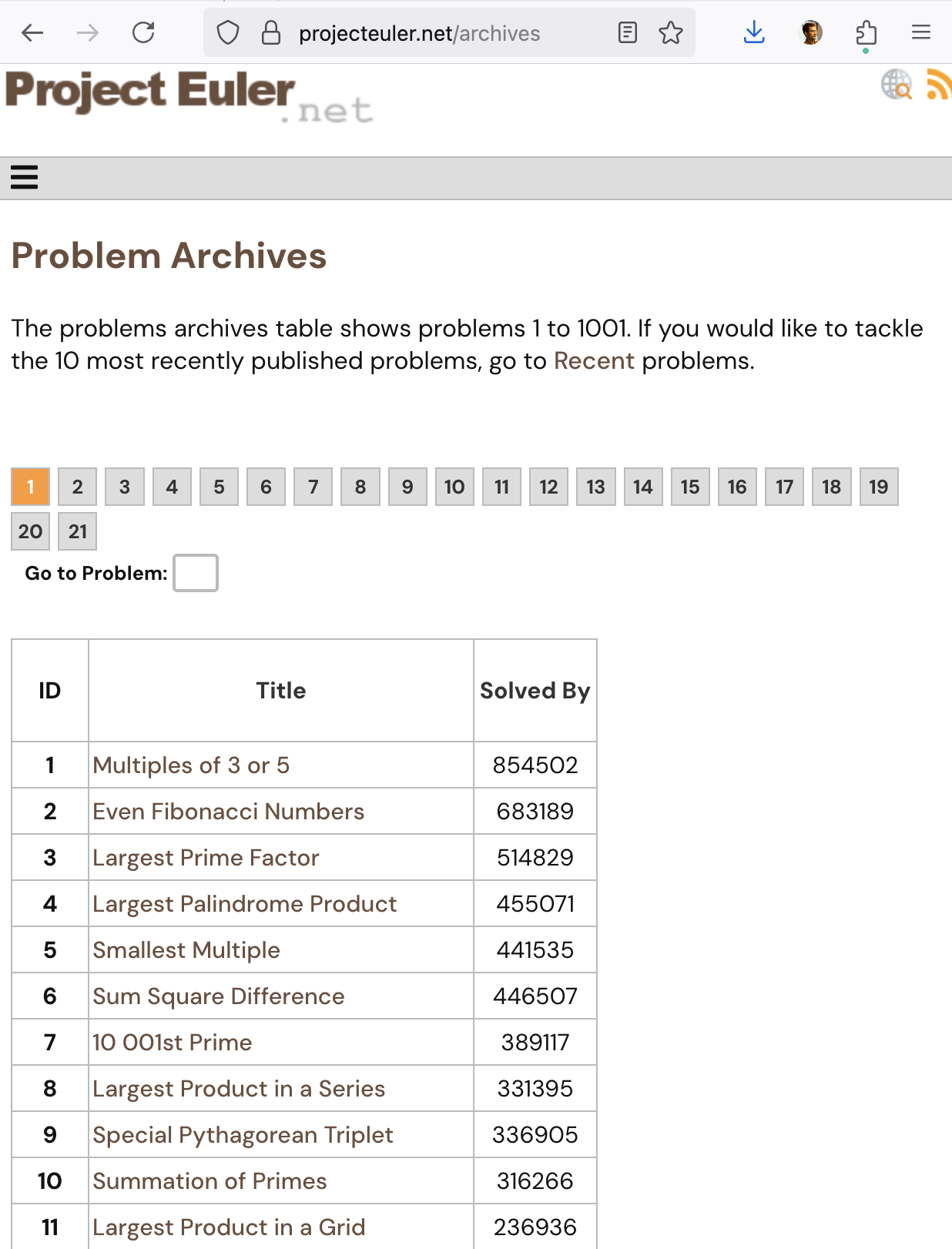
- Project Euler is an open set of programming challenges that has been running since 2001.
- Try problems 1, 6, or 7 depending on your level of programming profficiency
numpymay come in handy
Plotting in Python: matplotlib
- Download the
matplotliblibrary from Thonny’s Tools > Manage Packages menu - See the official documentation
mport numpy as np
import matplotlib.pyplot as plt

xvals = np.linspace(0,2*np.pi,200)
yvals = np.sin(xvals)

plt.plot(xvals,yvals)
plt.show()